# Smart Home Front-end Devices

# reTerminal E1001

## Overview

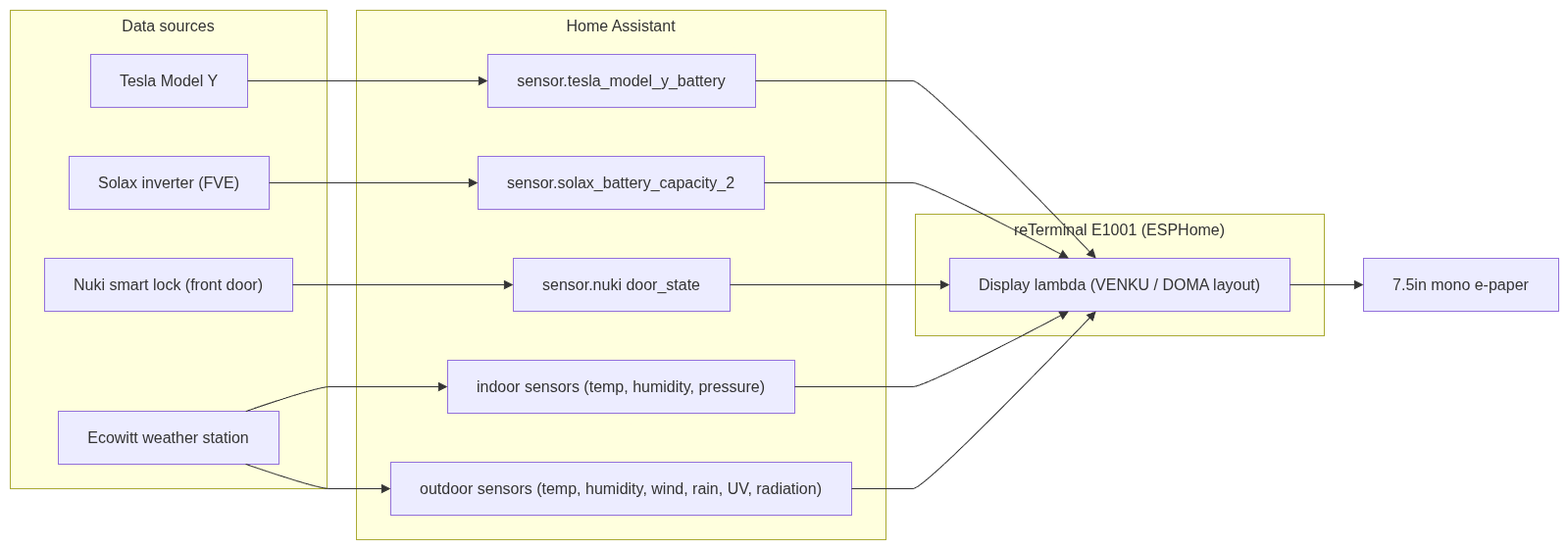
The reTerminal E1001 is a 7.5" monochrome e-paper display mounted in the **obývák (living room)**. It shows a weather-station dashboard driven by Home Assistant, combining outdoor conditions from an Ecowitt weather station, indoor climate, solar/battery status, and household state (front door, Tesla).

It is a companion to the **E1004** (color display in the kitchen) and shares the same visual language — matching icons, footer style, and refresh behavior.

<table id="bkmrk-property-value-model"><thead><tr><th>Property</th><th>Value</th></tr></thead><tbody><tr><td>Model</td><td>Seeed reTerminal E1001 (7.5" mono e-paper)</td></tr><tr><td>Resolution</td><td>800 × 480, landscape</td></tr><tr><td>Panel driver</td><td>`waveshare_epaper`, model `7.50inv2`</td></tr><tr><td>MCU</td><td>ESP32-S3</td></tr><tr><td>Power</td><td>Permanently powered (deep sleep disabled)</td></tr><tr><td>Location</td><td>Obývák (living room)</td></tr><tr><td>Firmware</td><td>ESPHome</td></tr><tr><td>Flashing</td><td>Wireless (OTA) — no USB cable needed</td></tr></tbody></table>

---

## Data flow

<div drawio-diagram="16"><img src="https://bs.sevcik.tech/uploads/images/drawio/2026-08/drawing-1-1787169269.png" alt="drawing-1-1787169269.png"/></div>

## What it displays

The layout is a two-column dashboard:

### Left side – Outdoor (VENKU)

- Large current outdoor temperature (headline number)
- Feels-like (Pocitová), dew point (Rosa), UV index, solar radiation (Záření)
- Humidity (Vlhkost) as a large percentage
- Wind (VÍTR): speed, direction, gusts
- Rain (DÉŠŤ): current intensity and today's total

### Right side – Indoor &amp; Home (DOMA)

- Indoor temperature + humidity
- Air pressure (Tlak)
- Precipitation totals (week / month / year)
- **Door state (DVEŘE)** – main front door open/closed
- **Batteries** – FVE (home solar battery) and Tesla vehicle battery, with home and car icons

### Footer

- **Meteostanice** – Ecowitt signal strength bars + station battery %
- **WiFi** – device WiFi signal strength bars
- **Aktualizace HH:MM** – time of last display refresh

---

## Data sources (Home Assistant entities)

<table id="bkmrk-display-item-ha-enti"><thead><tr><th>Display item</th><th>HA entity</th></tr></thead><tbody><tr><td>Outdoor temp</td><td>`sensor.ecowitt_outdoor_temp_120fb`</td></tr><tr><td>Outdoor humidity</td><td>`sensor.ecowitt_outdoor_humidity_120fb`</td></tr><tr><td>Indoor temp</td><td>`sensor.ecowitt_temperature_indoor`</td></tr><tr><td>Indoor humidity</td><td>`sensor.ecowitt_humidity_humidityin`</td></tr><tr><td>Pressure</td><td>Ecowitt pressure sensor</td></tr><tr><td>Wind / rain / UV / radiation</td><td>Ecowitt `*_120fb` sensors</td></tr><tr><td>Door state</td><td>`sensor.nuki_sevcikovi_door_state`</td></tr><tr><td>FVE battery</td><td>`sensor.solax_battery_capacity_2`</td></tr><tr><td>Tesla battery</td><td>`sensor.tesla_model_y_battery`</td></tr><tr><td>Ecowitt signal</td><td>`sensor.ecowitt_signal_strength_120fb`</td></tr></tbody></table>

---

## Refresh behaviour

To keep the e-paper calm (color/mono e-paper refresh is slow and visually noticeable), the display does **not** refresh constantly. It updates on:

- **Every 5 minutes** – scheduled interval
- **Outdoor temperature change** – debounced (8 s) so bursts collapse into one refresh
- **Door state change** – **instant** refresh (so an opened front door shows immediately)
- **Manual button** – `button.reterminal_e1001_e1001_refresh_display`, exposed in HA and on the Kiosk / Overview dashboards

A debounced redraw script prevents rapid-fire refreshes: any trigger schedules a single redraw a few seconds later rather than refreshing immediately (except the door, which is intentionally instant).

---

## Manual refresh

A template button is exposed to Home Assistant:

- **Entity:** `button.reterminal_e1001_e1001_refresh_display`
- Available on the **Kiosk** dashboard ("Displej obyvak") and the **Overview** dashboard
- Pressing it forces an immediate full redraw

---

## Hardware / pin notes

- **Deep sleep is disabled** – the device is permanently powered, so it stays awake and is always reachable for OTA flashing. (Originally, deep sleep made OTA unreliable because the device was only awake briefly; disabling it fixed wireless flashing.)
- **I²C sensor (SHT40):** sda = GPIO19, scl = GPIO20. ESPHome logs a harmless warning that these pins are shared with the USB-Serial-JTAG interface — this can be ignored (flashing works over WiFi and native USB, not those pins).
- The device's **own battery voltage** ("Zařízení") was removed from the footer — it is permanently powered, so that value was meaningless.

---

## Icons (shared with E1004 for consistency)

<table id="bkmrk-meaning-mdi-icon-tem"><thead><tr><th>Meaning</th><th>MDI icon</th></tr></thead><tbody><tr><td>Temperature</td><td>`thermometer` (U+F050F)</td></tr><tr><td>Humidity</td><td>`water-percent` (U+F058E)</td></tr><tr><td>FVE / home</td><td>`home` (U+F02DC)</td></tr><tr><td>Tesla / car</td><td>`car-electric` (U+F0B6C)</td></tr><tr><td>Door</td><td>`door-open` / `door-closed`</td></tr></tbody></table>

---

## Configuration reference

The full ESPHome YAML is stored in \[link to your config location\].

> **Note:** the snippet below is sanitised. The real config also contains an API encryption key, an OTA password, and WiFi credentials — **these are secrets and are NOT included here.** See the corresponding entry in the password manager.

```yaml
# ── reTerminal E1001 (excerpt, secrets removed) ──
esphome:
  name: reterminal-e1001

esp32:
  board: esp32-s3-devkitc-1
  framework:
    type: esp-idf

# Secrets removed – see password manager:
#   api:  encryption key
#   ota:  password
#   wifi: ssid / password

spi:
  clk_pin: GPIO7
  mosi_pin: GPIO9

i2c:
  sda: GPIO19       # shared with USB-JTAG (harmless warning)
  scl: GPIO20

# Debounced redraw – collapses bursts into a single refresh
script:
  - id: request_redraw
    mode: restart
    then:
      - delay: 8s
      - component.update: epaper_display

# Manual refresh button (exposed to Home Assistant)
button:
  - platform: template
    name: "E1001 Refresh Display"
    on_press:
      then:
        - component.update: epaper_display

# 5-minute periodic refresh
interval:
  - interval: 5min
    then:
      - component.update: epaper_display

# Example trigger: instant refresh when the front door changes
text_sensor:
  - platform: homeassistant
    id: door_state
    entity_id: sensor.nuki_sevcikovi_door_state
    on_value:
      then:
        - component.update: epaper_display   # instant, not debounced

```

---

## History / lessons learned

- **nan display bug:** early versions showed `nan` because the display drew before HA sensor data had loaded (a leftover from the deep-sleep wake timing). Fixed by disabling deep sleep + redrawing on sensor `on_value` + the periodic interval.
- **Excessive refreshing:** outdoor temperature changes frequently; without debouncing this caused constant, distracting refreshes. The debounce script fixed it.
- **Layout consistency:** the FVE/Tesla/door section and footer were reworked to match the E1004's icon set and footer style so the two displays feel like one system.

# reTerminal E1004

## Overview

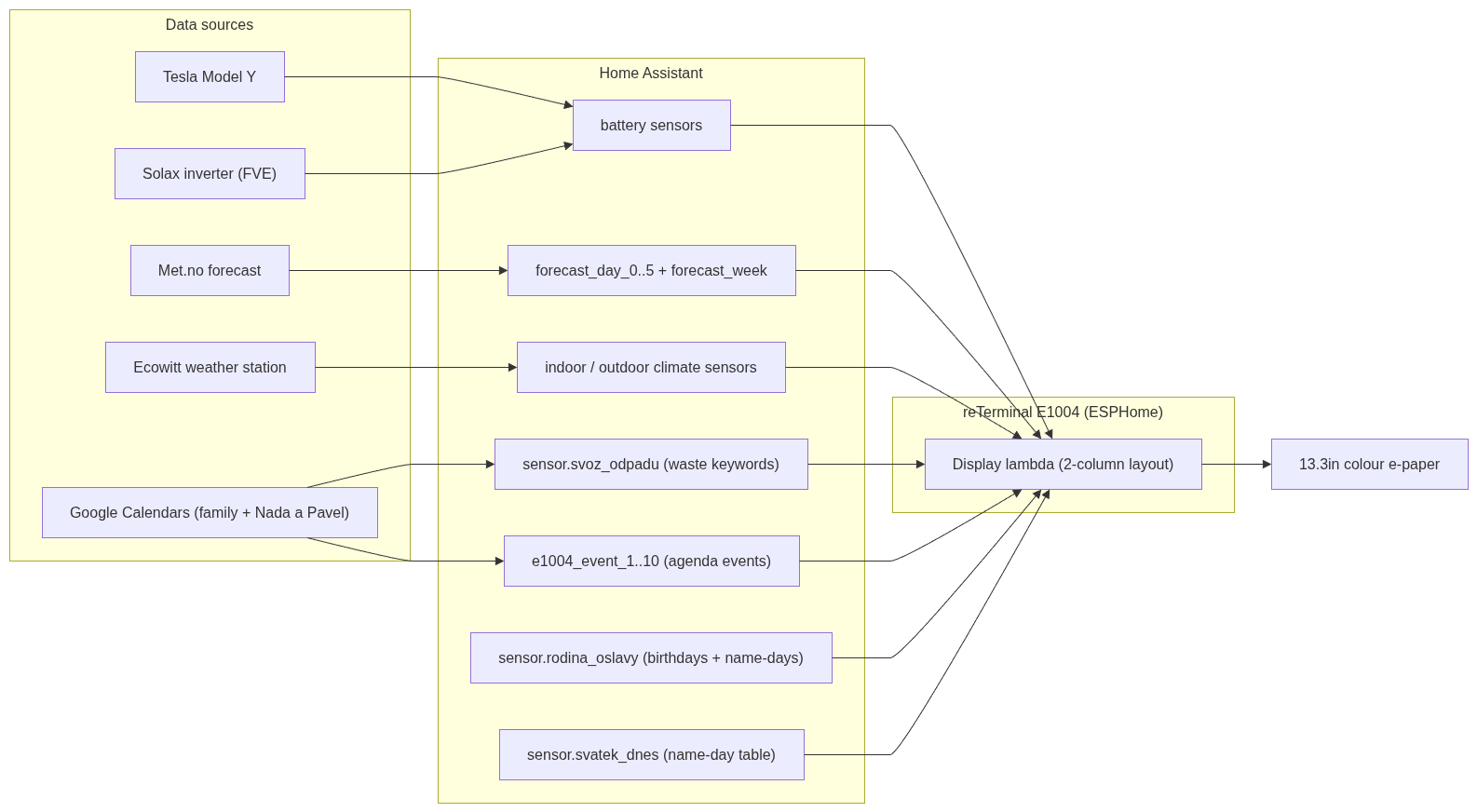
The reTerminal E1004 is a 13.3" **6-colour (Spectra 6)** e-paper display mounted in the **kuchyň (kitchen)**. It is the household's central family dashboard: a colour calendar/agenda on the left, and a stacked column of live information on the right (weather, home &amp; outdoor climate, upcoming family celebrations, waste-collection schedule, solar/car batteries, and a weekly temperature chart).

It is the colour companion to the **E1001** (mono weather display in the living room) and shares the same icon language, footer style, and refresh philosophy.

<table id="bkmrk-property-value-model"><thead><tr><th>Property</th><th>Value</th></tr></thead><tbody><tr><td>Model</td><td>Seeed reTerminal E1004 (13.3" Spectra 6 colour e-paper)</td></tr><tr><td>Resolution</td><td>1200 × 1600, portrait</td></tr><tr><td>Colours</td><td>Black, white, red, green, blue, yellow (6-colour palette)</td></tr><tr><td>Panel model (ESPHome)</td><td>`Seeed-reTerminal-E1004`</td></tr><tr><td>MCU</td><td>ESP32-S3 with 8 MB PSRAM (octal, 80 MHz)</td></tr><tr><td>Power</td><td>Permanently powered (deep sleep disabled)</td></tr><tr><td>Location</td><td>Kuchyň (kitchen)</td></tr><tr><td>Firmware</td><td>ESPHome</td></tr><tr><td>Flashing</td><td>Wireless (OTA)</td></tr></tbody></table>

---

## Data flow

<div drawio-diagram="15"><img src="https://bs.sevcik.tech/uploads/images/drawio/2026-08/drawing-1-1787169129.png" alt="drawing-1-1787169129.png"/></div>

---

## What it displays

### Header

- Full Czech day name + date (e.g. *"Pondělí 17.08.2026"*)
- Today's Czech name-day (*svátek*) on the right

### Left column – Agenda

- Upcoming calendar events grouped by day (Czech day labels: Po, Út, St…)
- Event titles **colour-coded by calendar**: green = Family, red = Naďa a Pavel
- Time or "Celý den" (all-day) below each event
- Multi-day events show "· do DD.MM"
- **Long titles are truncated with "…"** so they don't overflow into the right column

### Right column (top to bottom)

1. **Blíží se** – next 3 upcoming family celebrations (birthdays with age, and name-days). Red = birthday, green = name-day. Twins Daniel &amp; Dominik are combined onto one birthday line.
2. **Svoz odpadu** – next collection date per waste type: BIO (leaf), Papír (newspaper), Plast (bottle), Směsný (bin) — each with a coloured icon.
3. **Baterie** – FVE (home solar) % with a house icon, Tesla % with a car icon.
4. **Doma / Venku** – indoor and outdoor temperature + humidity, with thermometer and droplet icons.
5. **Počasí** – 6-day forecast with colour weather icons (red sun, blue rain, clouds) and high/low temps.
6. **Týden** – a 6-day high-temperature bar chart, bars colour-coded (red ≥ 28°, blue ≤ 18°, black otherwise).

### Footer

- **Aktualizováno HH:MM** – last refresh time
- **WiFi** signal strength bars

---

## Home Assistant sensors that power it

These are custom template sensors built in `configuration.yaml`:

<table id="bkmrk-sensor-purpose-senso"><thead><tr><th>Sensor</th><th>Purpose</th></tr></thead><tbody><tr><td>`sensor.svatek_dnes`</td><td>Today's Czech name-day, from an embedded 366-day table</td></tr><tr><td>`sensor.rodina_oslavy`</td><td>Family birthdays + name-days; `state` = today's celebrations, `upcoming` attribute = next celebrations (JSON)</td></tr><tr><td>`sensor.svoz_odpadu`</td><td>Scans both calendars for BIO/PAPÍR/PLAST/SMĚSNÝ keywords; attributes `bio`,`papir`,`plast`,`smesny` hold the next date per type</td></tr><tr><td>`sensor.forecast_day_0..5_*`</td><td>Per-day condition / temp / templow</td></tr><tr><td>`sensor.forecast_week`</td><td>Weekly highs as a pipe-separated string (`Po:26</td></tr><tr><td>`sensor.e1004_event_1..10`</td><td>Per-event agenda data (title, day label, time, colour)</td></tr><tr><td>Ecowitt climate sensors</td><td>Indoor/outdoor temperature &amp; humidity</td></tr><tr><td>`sensor.solax_battery_capacity_2`</td><td>FVE battery %</td></tr><tr><td>`sensor.tesla_model_y_battery`</td><td>Tesla battery %</td></tr></tbody></table>

---

## Refresh behaviour

```mermaid
flowchart TD
    A["Calendar event changes"] -->|instant, debounced 8s| R["request_redraw script"]
    B["5-minute interval"] --> D["Display refresh"]
    C["Manual button in HA"] --> D
    R --> D
    D --> S["Redraw e-paper"]

```

- **Every 5 minutes** – scheduled refresh (keeps weather, climate, batteries current)
- **Calendar event change** – triggers the debounced redraw (new events appear promptly)
- **Manual button** – `button.reterminal_e1004_e1004_refresh_display`
- Temperature/weather changes do **not** trigger refreshes directly (they ride the 5-minute interval), to avoid constant flashing.

---

## Key lessons learned (build history)

- **String vs float sensors:** several HA-attribute sensors return **strings** (e.g. "17.8.", family lines). These must be defined as `text_sensor` in ESPHome, not numeric `sensor`. Mixing them up caused compile errors (`.c_str()` on a float) and a firmware that never built — so the device kept running old firmware.
- **`to_json` spacing:** an early approach passed data as JSON attributes and parsed it on-device; HA's `to_json` adds spaces after colons (`"d": 17`), which broke a strict parser. Solved by switching to simple pre-formatted string attributes (`bio`, `papir`, …) instead of JSON.
- **Entity name typos:** `forecast_dayN` vs `forecast_day_N` (missing underscore) and `run__state` (double underscore, unrelated washer bug) both caused silent failures. Lesson: verify entity IDs against **Developer Tools → States**.
- **MDI codepoints:** several icon glyphs were initially wrong (cake, party-popper, night) and rendered as empty boxes — codepoints must be verified against the actual font.
- **Yellow on white is unreadable** on e-paper: the "sunny" icon was switched from yellow to **red** for contrast.
- **Refresh discipline:** the display only redraws on meaningful changes + a 5-minute interval, because colour e-paper refresh is slow and visually distracting.

---

## Configuration reference

> **Sanitised.** The real config contains an API encryption key, an OTA password, and WiFi credentials. **These secrets are NOT included here** — see the password manager. Full config stored at \[link to your config location\].

```yaml
# ── reTerminal E1004 (excerpt, secrets removed) ──
esphome:
  name: reterminal-e1004

esp32:
  board: esp32-s3-devkitc-1
  framework:
    type: esp-idf

psram:
  mode: octal
  speed: 80MHz

spi:
  clk_pin: GPIO7
  mosi_pin: GPIO9

# Secrets removed – see password manager:
#   api / ota / wifi

display:
  - platform: epaper_spi
    model: Seeed-reTerminal-E1004
    update_interval: never       # driven by interval + triggers instead
    rotation: 0
    # lambda: two-column layout (agenda left, info column right)

interval:
  - interval: 5min
    then:
      - component.update: epaper_display

button:
  - platform: template
    name: "E1004 Refresh Display"
    on_press:
      then:
        - component.update: epaper_display

```

# Raspberry Pi with Touch Display

[![image.png](https://bs.sevcik.tech/uploads/images/gallery/2026-08/scaled-1680-/pXQimage.png)](https://bs.sevcik.tech/uploads/images/gallery/2026-08/pXQimage.png)