
reTerminal E1001
Overview
The reTerminal E1001 is a 7.5" monochrome e-paper display mounted in the obývák (living room). It shows a weather-station dashboard driven by Home Assistant, combining outdoor conditions from an Ecowitt weather station, indoor climate, solar/battery status, and household state (front door, Tesla).
It is a companion to the E1004 (color display in the kitchen) and shares the same visual language — matching icons, footer style, and refresh behavior.
| Property | Value |
|---|---|
| Model | Seeed reTerminal E1001 (7.5" mono e-paper) |
| Resolution | 800 × 480, landscape |
| Panel driver | waveshare_epaper, model 7.50inv2 |
| MCU | ESP32-S3 |
| Power | Permanently powered (deep sleep disabled) |
| Location | Obývák (living room) |
| Firmware | ESPHome |
| Flashing | Wireless (OTA) — no USB cable needed |
Data flow
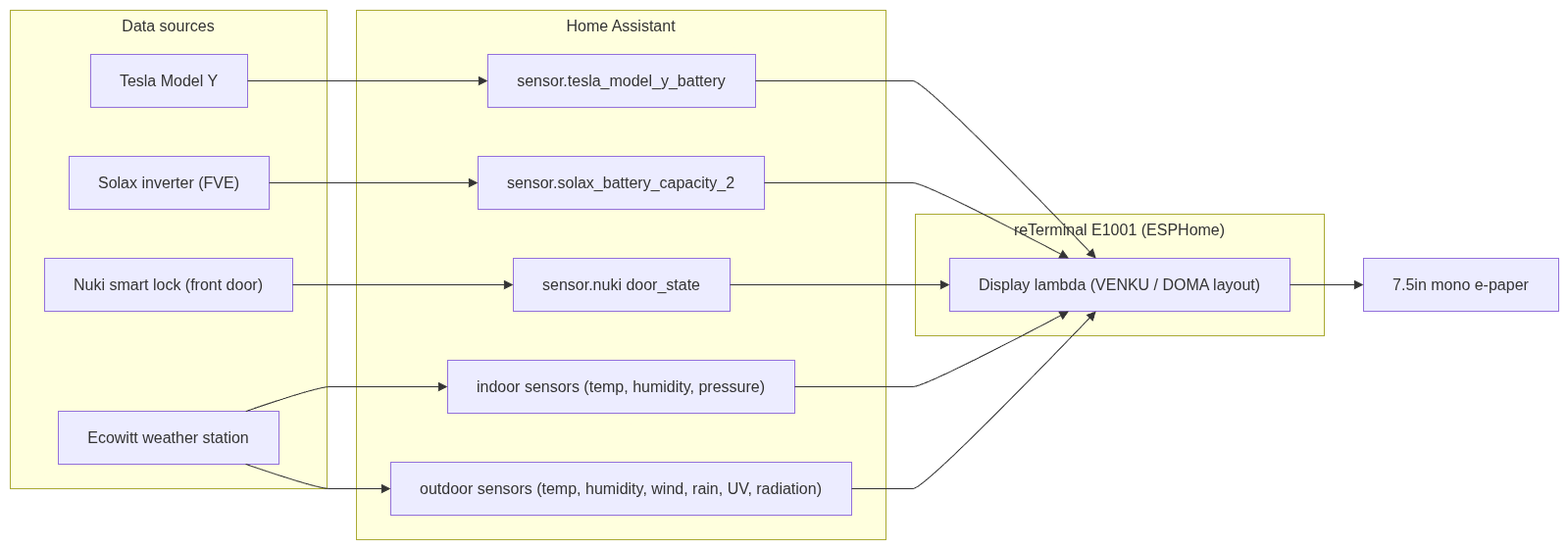
What it displays
The layout is a two-column dashboard:
Left side – Outdoor (VENKU)
- Large current outdoor temperature (headline number)
- Feels-like (Pocitová), dew point (Rosa), UV index, solar radiation (Záření)
- Humidity (Vlhkost) as a large percentage
- Wind (VÍTR): speed, direction, gusts
- Rain (DÉŠŤ): current intensity and today's total
Right side – Indoor & Home (DOMA)
- Indoor temperature + humidity
- Air pressure (Tlak)
- Precipitation totals (week / month / year)
- Door state (DVEŘE) – main front door open/closed
- Batteries – FVE (home solar battery) and Tesla vehicle battery, with home and car icons
Footer
- Meteostanice – Ecowitt signal strength bars + station battery %
- WiFi – device WiFi signal strength bars
- Aktualizace HH:MM – time of last display refresh
Data sources (Home Assistant entities)
| Display item | HA entity |
|---|---|
| Outdoor temp | sensor.ecowitt_outdoor_temp_120fb |
| Outdoor humidity | sensor.ecowitt_outdoor_humidity_120fb |
| Indoor temp | sensor.ecowitt_temperature_indoor |
| Indoor humidity | sensor.ecowitt_humidity_humidityin |
| Pressure | Ecowitt pressure sensor |
| Wind / rain / UV / radiation | Ecowitt *_120fb sensors |
| Door state | sensor.nuki_sevcikovi_door_state |
| FVE battery | sensor.solax_battery_capacity_2 |
| Tesla battery | sensor.tesla_model_y_battery |
| Ecowitt signal | sensor.ecowitt_signal_strength_120fb |
Refresh behaviour
To keep the e-paper calm (color/mono e-paper refresh is slow and visually noticeable), the display does not refresh constantly. It updates on:
- Every 5 minutes – scheduled interval
- Outdoor temperature change – debounced (8 s) so bursts collapse into one refresh
- Door state change – instant refresh (so an opened front door shows immediately)
- Manual button –
button.reterminal_e1001_e1001_refresh_display, exposed in HA and on the Kiosk / Overview dashboards
A debounced redraw script prevents rapid-fire refreshes: any trigger schedules a single redraw a few seconds later rather than refreshing immediately (except the door, which is intentionally instant).
Manual refresh
Hardware / pin notes
- Deep sleep is disabled – the device is permanently powered, so it stays awake and is always reachable for OTA flashing. (Originally, deep sleep made OTA unreliable because the device was only awake briefly; disabling it fixed wireless flashing.)
- I²C sensor (SHT40): sda = GPIO19, scl = GPIO20. ESPHome logs a harmless warning that these pins are shared with the USB-Serial-JTAG interface — this can be ignored (flashing works over WiFi and native USB, not those pins).
- The device's own battery voltage ("Zařízení") was removed from the footer — it is permanently powered, so that value was meaningless.
Icons (shared with E1004 for consistency)
| Meaning | MDI icon |
|---|---|
| Temperature | thermometer (U+F050F) |
| Humidity | water-percent (U+F058E) |
| FVE / home | home (U+F02DC) |
| Tesla / car | car-electric (U+F0B6C) |
| Door | door-open / door-closed |
Configuration reference
The full ESPHome YAML is stored in [link to your config location].
Note: the snippet below is sanitised. The real config also contains an API encryption key, an OTA password, and WiFi credentials — these are secrets and are NOT included here. See the corresponding entry in the password manager.
# ── reTerminal E1001 (excerpt, secrets removed) ──
esphome:
  name: reterminal-e1001

esp32:
  board: esp32-s3-devkitc-1
  framework:
    type: esp-idf

# Secrets removed – see password manager:
#   api:  encryption key
#   ota:  password
#   wifi: ssid / password

spi:
  clk_pin: GPIO7
  mosi_pin: GPIO9

i2c:
  sda: GPIO19       # shared with USB-JTAG (harmless warning)
  scl: GPIO20

# Debounced redraw – collapses bursts into a single refresh
script:
  - id: request_redraw
    mode: restart
    then:
      - delay: 8s
      - component.update: epaper_display

# Manual refresh button (exposed to Home Assistant)
button:
  - platform: template
    name: "E1001 Refresh Display"
    on_press:
      then:
        - component.update: epaper_display

# 5-minute periodic refresh
interval:
  - interval: 5min
    then:
      - component.update: epaper_display

# Example trigger: instant refresh when the front door changes
text_sensor:
  - platform: homeassistant
    id: door_state
    entity_id: sensor.nuki_sevcikovi_door_state
    on_value:
      then:
        - component.update: epaper_display   # instant, not debounced
History / lessons learned
- nan display bug: early versions showed
nanbecause the display drew before HA sensor data had loaded (a leftover from the deep-sleep wake timing). Fixed by disabling deep sleep + redrawing on sensoron_value+ the periodic interval. - Excessive refreshing: outdoor temperature changes frequently; without debouncing this caused constant, distracting refreshes. The debounce script fixed it.
- Layout consistency: the FVE/Tesla/door section and footer were reworked to match the E1004's icon set and footer style so the two displays feel like one system.
No comments to display
No comments to display