
reTerminal E1001
Overview
The reTerminal E1001 is a 7.5" monochrome e-paper display mounted in the obývák (living room). It shows a weather-station dashboard driven by Home Assistant, combining outdoor conditions from an Ecowitt weather station, indoor climate, solar/battery status, and household state (front door, Tesla).
It is a companion to the E1004 (color display in the kitchen) and shares the same visual language — matching icons, footer style, and refresh behavior.
| Property | Value |
|---|---|
| Model | Seeed reTerminal E1001 (7.5" mono e-paper) |
| Resolution | 800 × 480, landscape |
| Panel driver | waveshare_epaper, model 7.50inv2 |
| MCU | ESP32-S3 |
| Power | Permanently powered (deep sleep disabled) |
| Location | Obývák (living room) |
| Firmware | ESPHome |
| Flashing | Wireless (OTA) — no USB cable needed |
Data flow
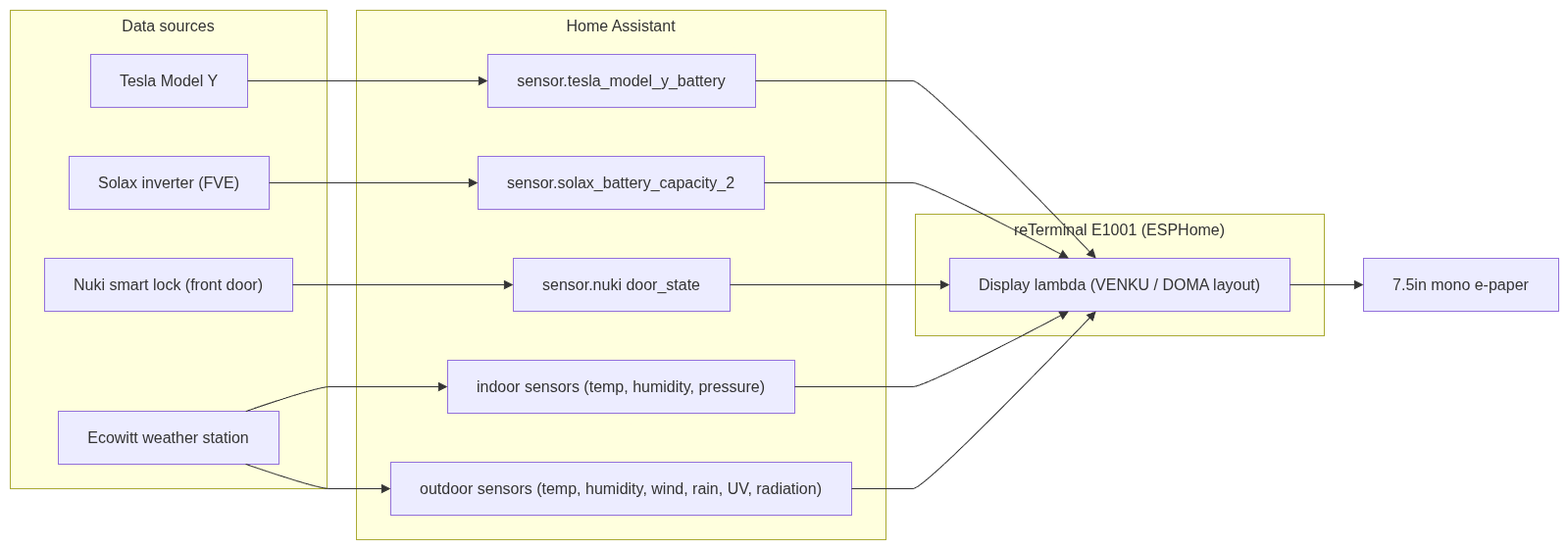
What it displays
The layout is a two-column dashboard:
Left side – Outdoor (VENKU)
- Large current outdoor temperature (headline number)
- Feels-like (Pocitová), dew point (Rosa), UV index, solar radiation (Záření)
- Humidity (Vlhkost) as a large percentage
- Wind (VÍTR): speed, direction, gusts
- Rain (DÉŠŤ): current intensity and today's total
Right side – Indoor & Home (DOMA)
- Indoor temperature + humidity
- Air pressure (Tlak)
- Precipitation totals (week / month / year)
- Door state (DVEŘE) – main front door open/closed
- Batteries – FVE (home solar battery) and Tesla vehicle battery, with home and car icons
Footer
- Meteostanice – Ecowitt signal strength bars + station battery %
- WiFi – device WiFi signal strength bars
- Aktualizace HH:MM – time of last display refresh
Data sources (Home Assistant entities)
| Display item | HA entity |
|---|---|
| Outdoor temp | sensor.ecowitt_outdoor_temp_120fb |
| Outdoor humidity | sensor.ecowitt_outdoor_humidity_120fb |
| Indoor temp | sensor.ecowitt_temperature_indoor |
| Indoor humidity | sensor.ecowitt_humidity_humidityin |
| Pressure | Ecowitt pressure sensor |
| Wind / rain / UV / radiation | Ecowitt *_120fb sensors |
| Door state | sensor.nuki_sevcikovi_door_state |
| FVE battery | sensor.solax_battery_capacity_2 |
| Tesla battery | sensor.tesla_model_y_battery |
| Ecowitt signal | sensor.ecowitt_signal_strength_120fb |
Refresh behaviour
To keep the e-paper calm (color/mono e-paper refresh is slow and visually noticeable), the display does not refresh constantly. It updates on:
- Every 5 minutes – scheduled interval
- Outdoor temperature change – debounced (8 s) so bursts collapse into one refresh
- Door state change – instant refresh (so an opened front door shows immediately)
- Manual button –
button.reterminal_e1001_e1001_refresh_display, exposed in HA and on the Kiosk / Overview dashboards
A debounced redraw script prevents rapid-fire refreshes: any trigger schedules a single redraw a few seconds later rather than refreshing immediately (except the door, which is intentionally instant).
Manual refresh
Hardware / pin notes
- Deep sleep is disabled – the device is permanently powered, so it stays awake and is always reachable for OTA flashing. (Originally, deep sleep made OTA unreliable because the device was only awake briefly; disabling it fixed wireless flashing.)
- I²C sensor (SHT40): sda = GPIO19, scl = GPIO20. ESPHome logs a harmless warning that these pins are shared with the USB-Serial-JTAG interface — this can be ignored (flashing works over WiFi and native USB, not those pins).
- The device's own battery voltage ("Zařízení") was removed from the footer — it is permanently powered, so that value was meaningless.
Icons (shared with E1004 for consistency)
| Meaning | MDI icon |
|---|---|
| Temperature | thermometer (U+F050F) |
| Humidity | water-percent (U+F058E) |
| FVE / home | home (U+F02DC) |
| Tesla / car | car-electric (U+F0B6C) |
| Door | door-open / door-closed |
Configuration reference
The full ESPHome YAML is stored in [link to your config location].
Note: the snippet below is sanitised. The real config also contains an API encryption key, an OTA password, and WiFi credentials — these are secrets and are NOT included here. See the corresponding entry in the password manager.
# ── reTerminal E1001 (excerpt, secrets removed) ──
esphome:
  name: reterminal-e1001

esp32:
  board: esp32-s3-devkitc-1
  framework:
    type: esp-idf

# Secrets removed – see password manager:
#   api:  encryption key
#   ota:  password
#   wifi: ssid / password

spi:
  clk_pin: GPIO7
  mosi_pin: GPIO9

i2c:
  sda: GPIO19       # shared with USB-JTAG (harmless warning)
  scl: GPIO20

# Debounced redraw – collapses bursts into a single refresh
script:
  - id: request_redraw
    mode: restart
    then:
      - delay: 8s
      - component.update: epaper_display

# Manual refresh button (exposed to Home Assistant)
button:
  - platform: template
    name: "E1001 Refresh Display"
    on_press:
      then:
        - component.update: epaper_display

# 5-minute periodic refresh
interval:
  - interval: 5min
    then:
      - component.update: epaper_display

# Example trigger: instant refresh when the front door changes
text_sensor:
  - platform: homeassistant
    id: door_state
    entity_id: sensor.nuki_sevcikovi_door_state
    on_value:
      then:
        - component.update: epaper_display   # instant, not debounced
History / lessons learned
- nan display bug: early versions showed
nanbecause the display drew before HA sensor data had loaded (a leftover from the deep-sleep wake timing). Fixed by disabling deep sleep + redrawing on sensoron_value+ the periodic interval. - Excessive refreshing: outdoor temperature changes frequently; without debouncing this caused constant, distracting refreshes. The debounce script fixed it.
- Layout consistency: the FVE/Tesla/door section and footer were reworked to match the E1004's icon set and footer style so the two displays feel like one system.